At IXL, we never stop adding new features and skills to our award-winning teaching and learning platform, so you can always trust we’re on pace with students’ evolving needs. That’s why we compile a list of our top new features to help you—as a learner, educator, or parent—get the most out of IXL.
Keep reading below for a roundup of releases from November, including the LevelUp™ Tier Analysis report, IXL Games on the iOS app, adding images and hyperlinks to “Write your own” questions, and more! To stay current with our latest updates, follow IXL on Facebook, Instagram, X, and LinkedIn.
Table of contents:
- Major releases
- Feature updates
- IXL Games on the IXL iOS app
- Images and hyperlinks for “Write your own” questions
- LevelUp national norm visualizations
- Reset LevelUp Benchmark results
- LevelUp ELA score cap increase
- Audio accommodation status in LevelUp reports
- LevelUp ELA Diagnostic standards reports for 4 more states
- LevelUp high school math standards report for AZ and WI
- Assessment timer update
- Filter IXL Quizzes by assignment
- Animation toggle in the IXL Raceway
- Secondary email for family accounts
- Skill plan updates and new skills
- Additional releases
Major releases
LevelUp™ Tier Analysis report
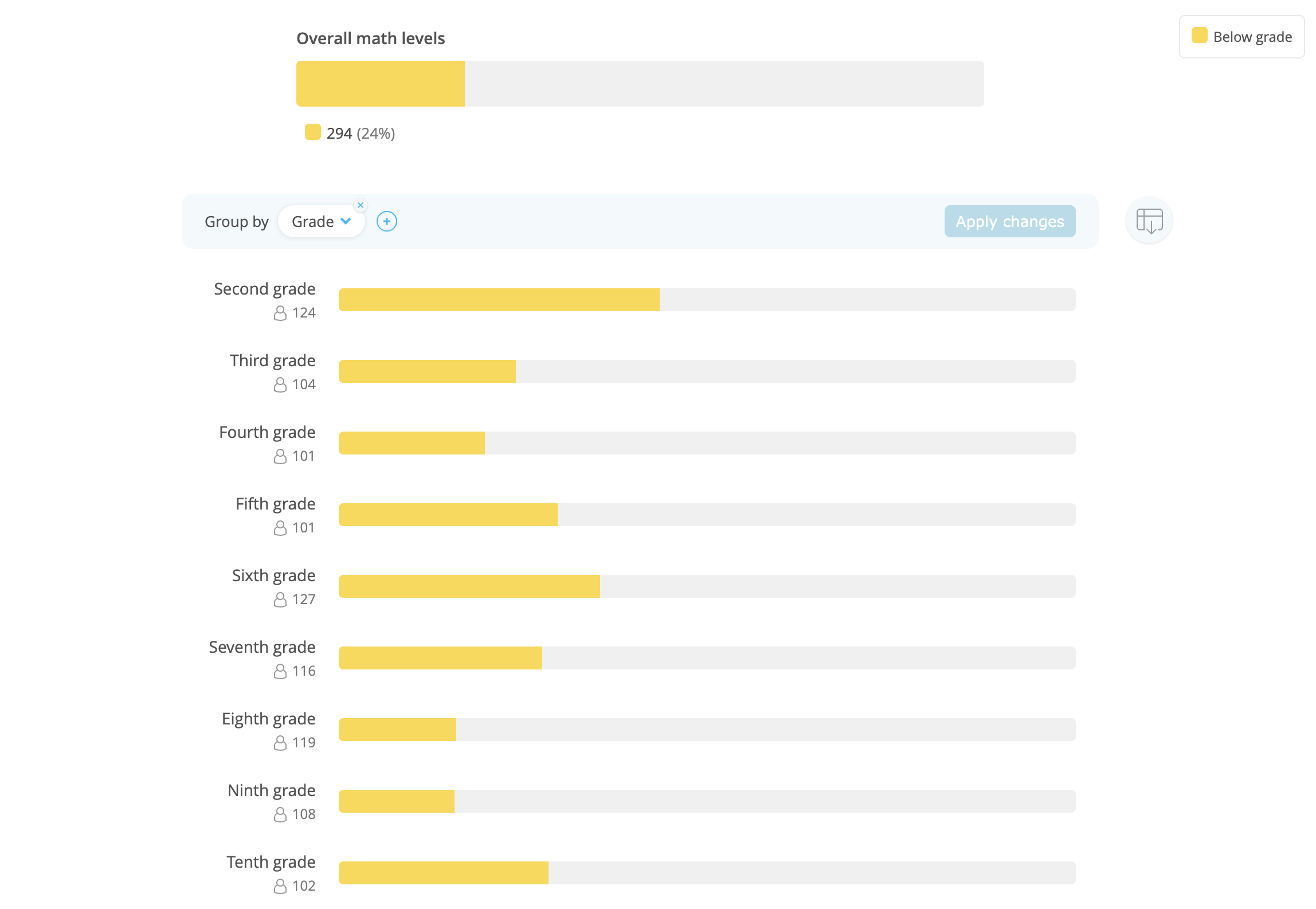
We have added a new report to our suite of LevelUp™ Diagnostic reporting for administrators: the LevelUp Tier Analysis report! This report enables administrators to view student performance by tier on the LevelUp Diagnostic, making it easy to identify which students are above, on, below, or far below grade level, as well as those who still need to complete the Benchmark or pinpoint their levels.
With the flexibility to filter by strand, course, and teacher, administrators can quickly dive into the data that matters most to guide targeted interventions and instructional support across classrooms or schools.
This new report can be found under the “Assessment” tab within Analytics, directly below the LevelUp Diagnostic Results report. Administrators can also access the LevelUp Tier Analysis report directly from the LevelUp Diagnostic Results report by clicking on the data visualization. We’re excited to make it as easy as possible for administrators to drill into the specific data that will be most helpful to their specific implementation.
Feature updates
IXL Games on the IXL iPad and iPhone apps
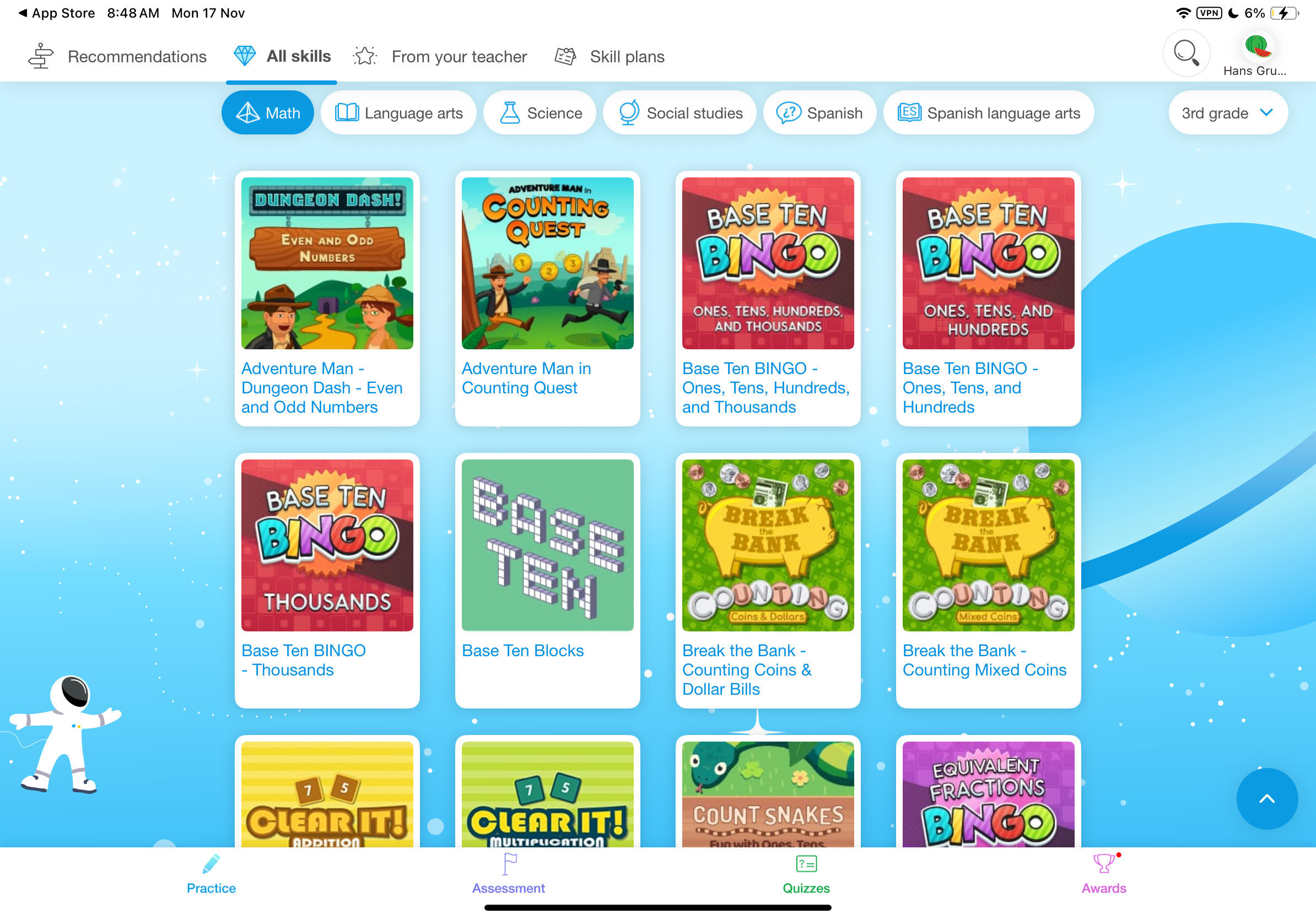
We’re thrilled to announce the addition of games to IXL’s iOS apps! Learners using the IXL app on their iPhone or iPad now have access to 450+ educational games that engage them on key topics.
To find games, tap the UFO button in the bottom-right of the “All skills” tab, or type a game name in the search bar. To leave the games section, tap the arrow button in the bottom-right.
Teachers and parents can optionally hide games through the settings page on the IXL website. Games are available for the US, CA, UK, and AU editions on devices using iOS version 11.0 and above.
Add images and hyperlinks to “Write your own” questions
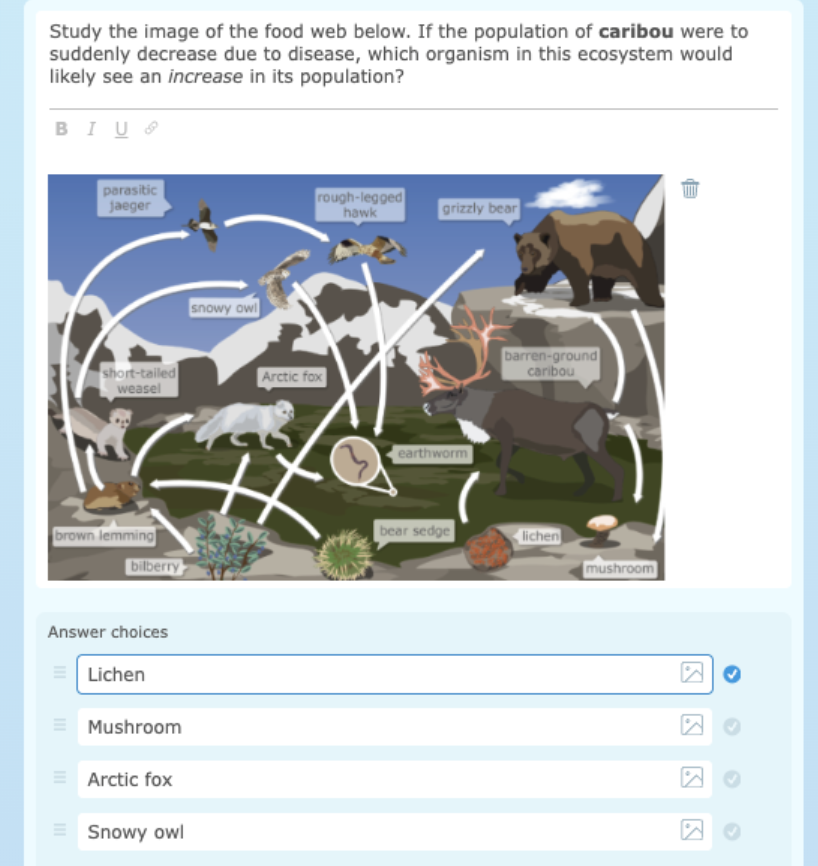
Teachers and administrators can now upload images and insert hyperlinks when writing their own questions for IXL Quizzes, Common Assessments, and Quiz Library resources! This update expands the possibilities with “write your own” questions, making them even more engaging and flexible.
Quiz authors can exercise their creativity and enrich students’ quiz-taking experience with diagrams, charts, or links to external resources. Images can be added to the question prompt and multiple-choice/multiple-select answer options. Hyperlinks can be added only to the question prompt.
National norm visualizations for the LevelUp Diagnostic
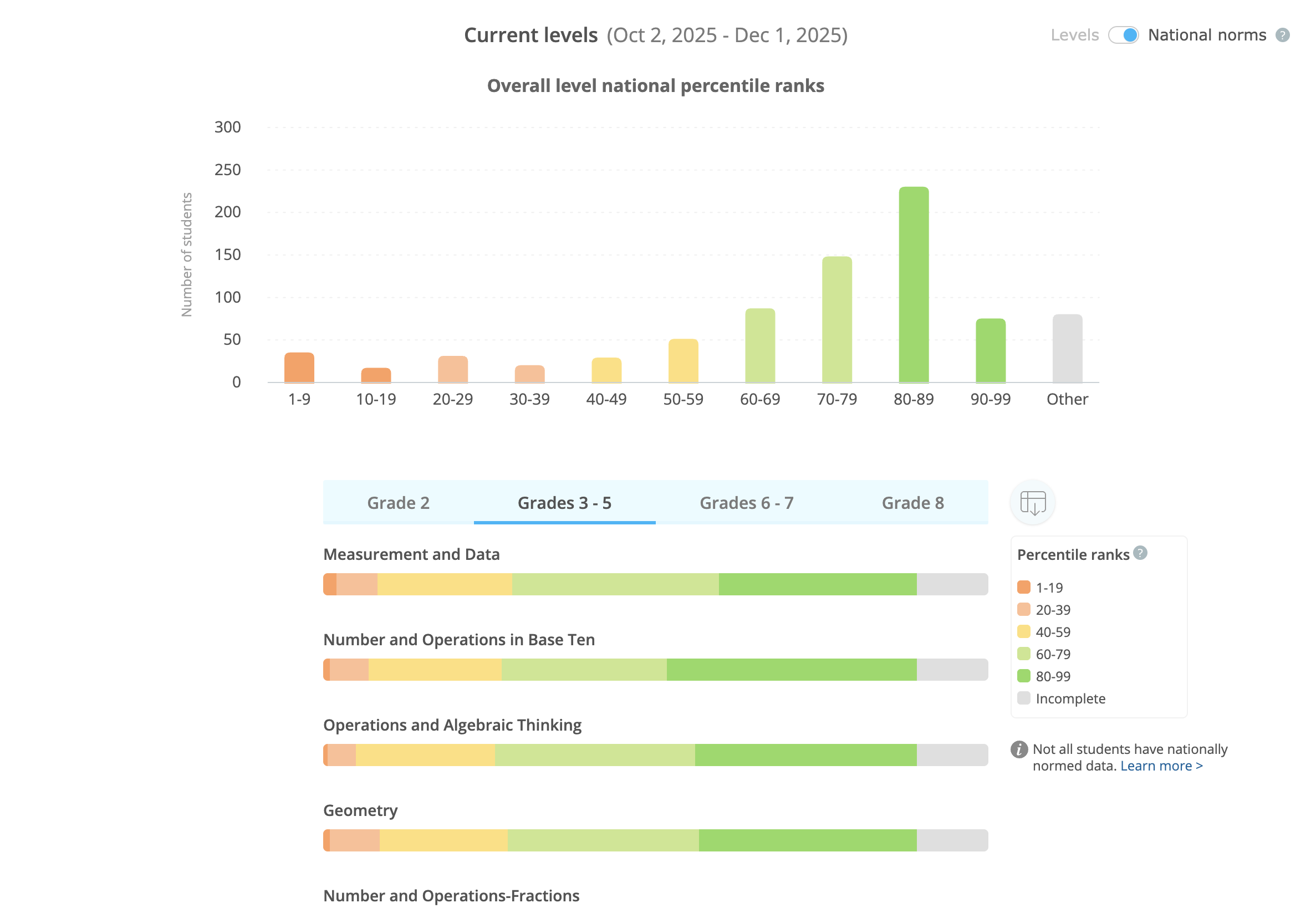
We have added a new visualization to help school and district administrators better interpret data from national norms for the LevelUp Diagnostic for math! Similar to the visualization for the Flex Diagnostic, admins can find a toggle on the LevelUp Diagnostic Results report to switch to the new norming view.
Administrators will even be able to compare national norm percentiles between two data time frames! National norms are currently available for students in grades K-8.
Reset LevelUp Benchmark results
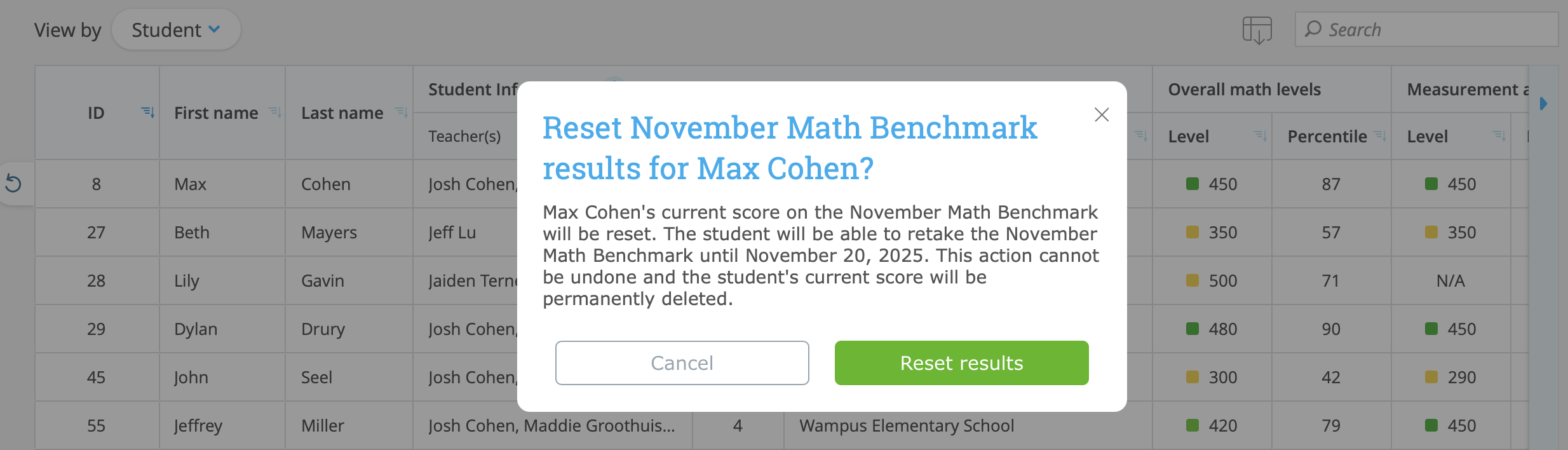
All lead admins can now reset individual student LevelUp Benchmark results directly from the LevelUp Diagnostic Results report! This update helps admins streamline the process of resetting Benchmark results, and ensures admins can maintain reliable and accurate Benchmark data for their students.
Lead admins can reset a student’s Benchmark by going to the LevelUp Diagnostic Results report and switching to the “View by student” table. Similar to assigning Common Assessment retakes, admins can locate the student whose Benchmark needs to be reset, hover over their row, and click the reset icon. Admins can only reset results for Benchmarks that are in an active Benchmark window.
When a student’s Benchmark score is reset:
- All associated data, including student scores, strand levels, recommendations, and Action Plans, is cleared from admin, teacher, and student reports.
- Admins cannot reset Real-Time mode scores. However, when a Benchmark is reset, Real-Time mode scores based on that Benchmark completion will also be cleared.
- The student whose Benchmark was reset can retake the Benchmark
- Accommodations (language, audio, and extended time) can be updated for that student before they begin their Benchmark again.
LevelUp Diagnostic for ELA score cap increases
The LevelUp Diagnostic for ELA will now increase students’ score caps for middle of year (MoY) and end of year (EoY) testing. This change will allow high-performing students to show growth throughout the year, while also maintaining the score caps to a degree necessary to ensure we’re always showing confident, accurate results.
LevelUp ELA score caps have increased by 50 points for MoY testing. On March 1st, the caps will increase by another 50 points for end of year EoY testing. Beginning of year (BoY) LevelUp ELA scores are still capped at 300 points above the student’s rostered grade level.
Here’s a quick reference showing the time frames and example score caps:
- BoY (Aug 1st – Nov 30th) score cap is 300 points above grade level
- For example, a 4th grader could score up to 700+ on the LevelUp Diagnostic for ELA
- MoY (Dec 1st – Feb. 28) score cap is 350 points above grade level
- For example, a 4th grader could score up to 750+
- EoY (Mar 1 – Jul 31) score cap will be 400 points above grade level
- For example, a 4th grader could score up to 800+ (the same as a BoY 5th grader)
Assessment windows that span across several of the above time frames will use the score cap associated with the start date of the window. For example, a window that spans from November 15th – December 15th will use the BoY score cap for all students, whether they receive their score in November or December.
Audio accommodation changes for the LevelUp Diagnostic
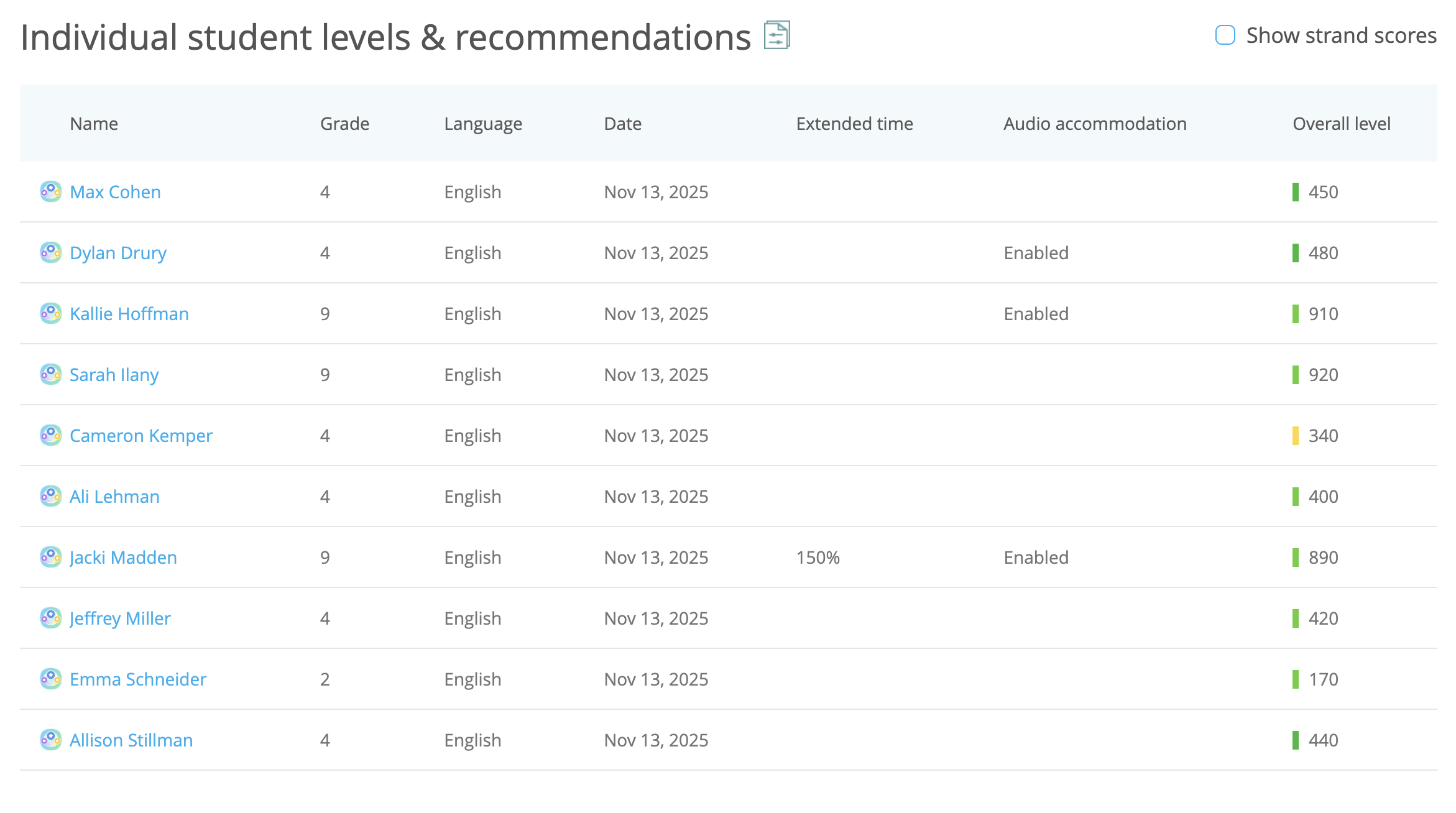
Admins and teachers can now see students’ audio accommodation status for LevelUp Benchmarks directly from their LevelUp reports! For teachers, audio accommodation status is displayed in both the report and export for the LevelUp Diagnostic Overview report. For admins, this status is displayed in the export for the LevelUp Diagnostic Results report.
Additionally, once a student begins a LevelUp Benchmark window, their audio accommodation status will remain fixed for the duration of that window. This change improves test integrity by keeping accommodations consistent across all questions within the assessment. If a teacher updates a student’s audio accommodation after the student has already started the Benchmark, a message will appear clarifying that the change will only apply to that student for future Benchmark windows.
LevelUp ELA Diagnostic standards reports for 4 more states
We’ve released IXL LevelUp Diagnostic for ELA standards reports for the following states:
- Indiana
- Missouri
- South Dakota
- Wisconsin
Teachers in these states will now be able to track their students’ knowledge of state standards after completing an ELA assessment.
LevelUp Math Diagnostic standards reports for Arizona and Wisconsin high school standards
We’ve added LevelUp Math Diagnostic standards reports for Arizona’s and Wisconsin’s high school math standards. For Arizona, the new courses included are Algebra I, Geometry, and Algebra II. For Wisconsin, they are Algebra I, Geometry, Algebra II, and Integrated Math 1, 2, and 3.
We will continue to release additional states’ high school standards reports in the coming months.
Assessment timer update
We have made improvements to make the assessment timer for LevelUp Benchmarks and Universal Screeners more visible to students. This timer appears when a student has 30 seconds left on any question. These updates will help students keep track of their time more easily and with minimal stress.
Specifically, the changes include:
- The timer is sticky, meaning that it will remain visible even as the student scrolls.
- Instead of appearing in the upper-right corner of the question box, the timer is now on the left side of the page.
- The timer displays the numbers 30, 20, 10, and then 5, 4, 3, 2, 1, 0 as the seconds run out.
Filter IXL Quizzes by assignment
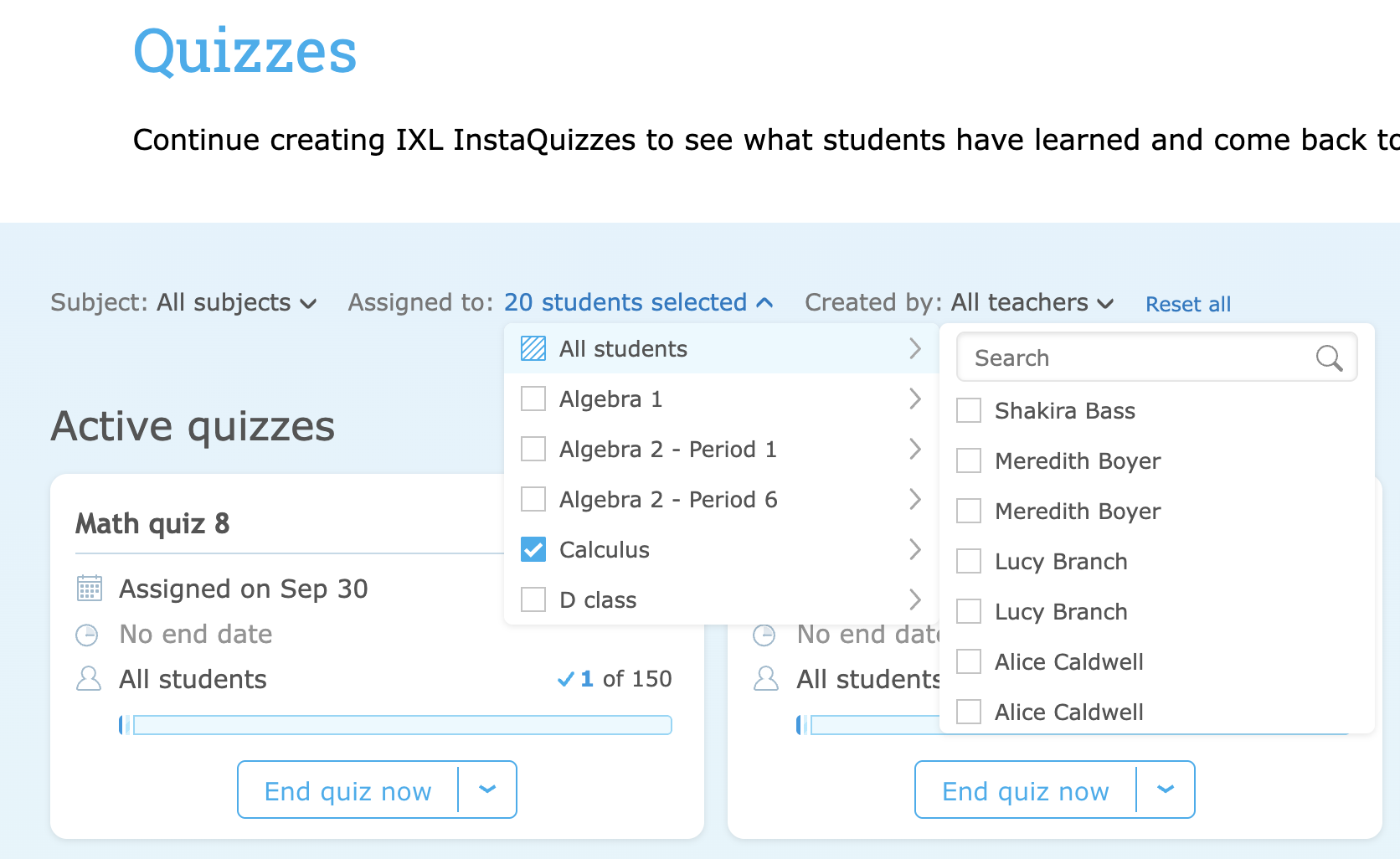
We’ve added a new filter on the IXL Quizzes page that lets teachers quickly find quizzes assigned to a particular student or class. This new filter appears alongside existing filters for ‘Subject’ and ‘Created by’, which together help teachers more easily manage their list of quizzes.
Animation toggle in the IXL Raceway
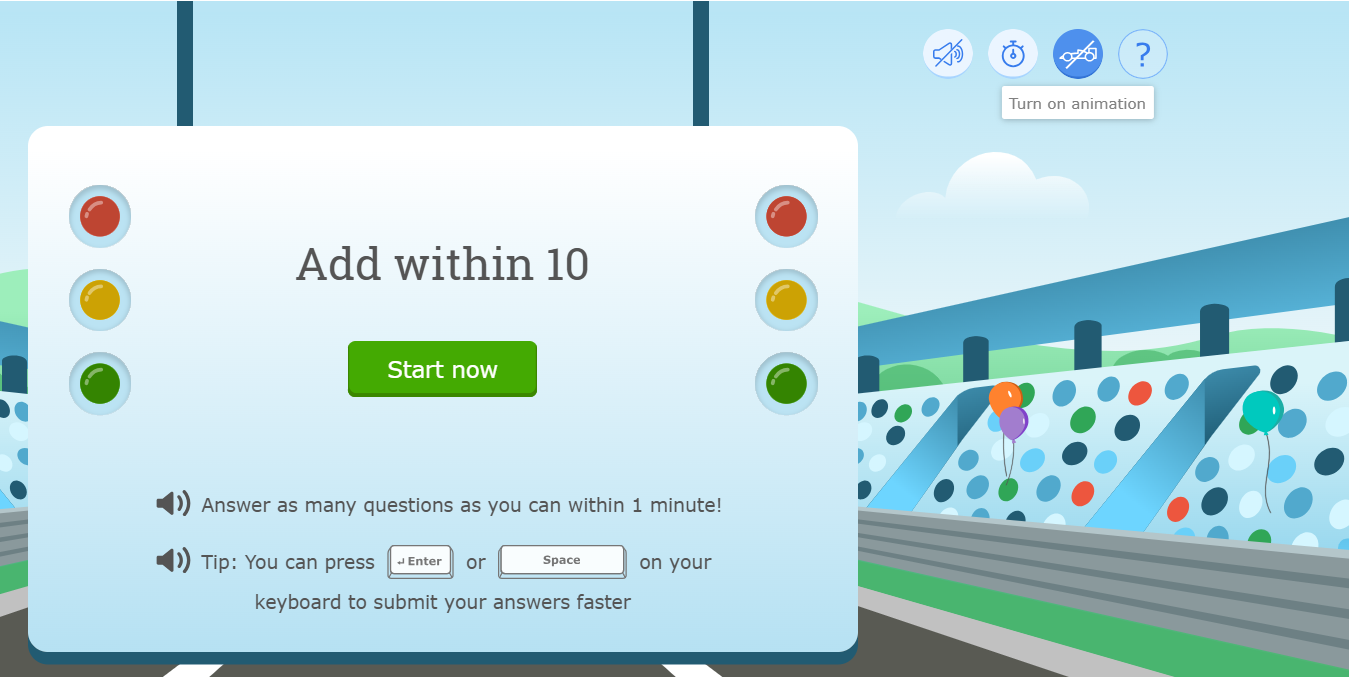
The IXL Raceway now offers an option to fully animate students’ experience, making learning math facts with IXL even more fun! This option can be enabled by clicking the race car toggle on the Raceway start screen.
When animation is toggled on, students will drive towards the finish line with every question they answer, regardless of it being correct or incorrect. For a fully immersive experience, students can also turn on sound effects using the sound toggle, if they haven’t already!
Secondary email for family accounts
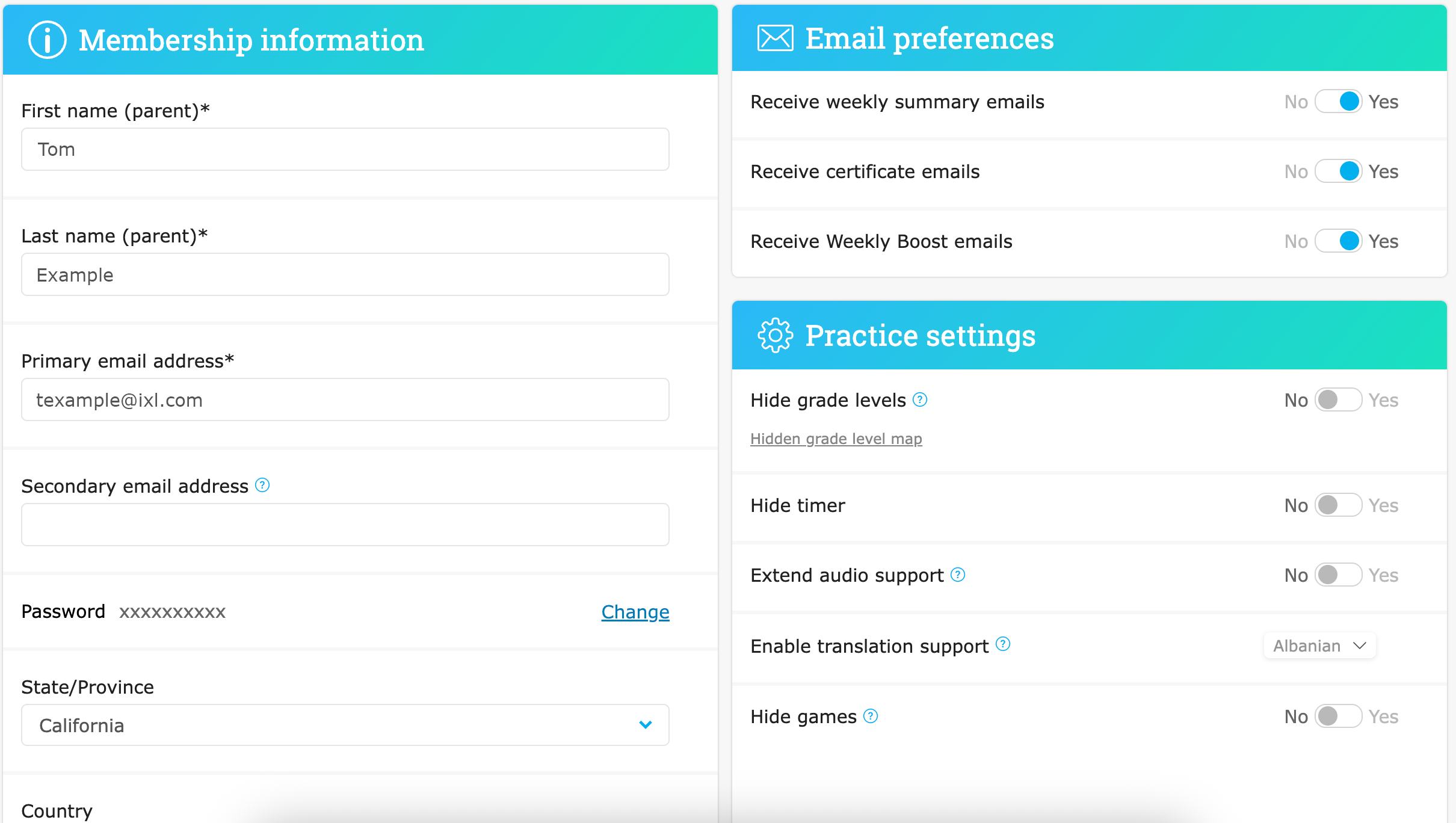
Family users can now add a secondary email address to their account, making it possible to receive email updates about children’s activity on IXL to multiple email addresses! Secondary email addresses can receive update emails (such as Weekly Boost, weekly summary, and certificate emails), but will not receive any marketing or account management emails (such as expiring subscription reminders and password resets).
Family users will be able to add a secondary email address through a new field on their profile & settings. With this update, we have also revamped the profile & settings page on family accounts to make finding email preferences more clear.
Skill plan updates and new skills
Winter Adventure skill plans return
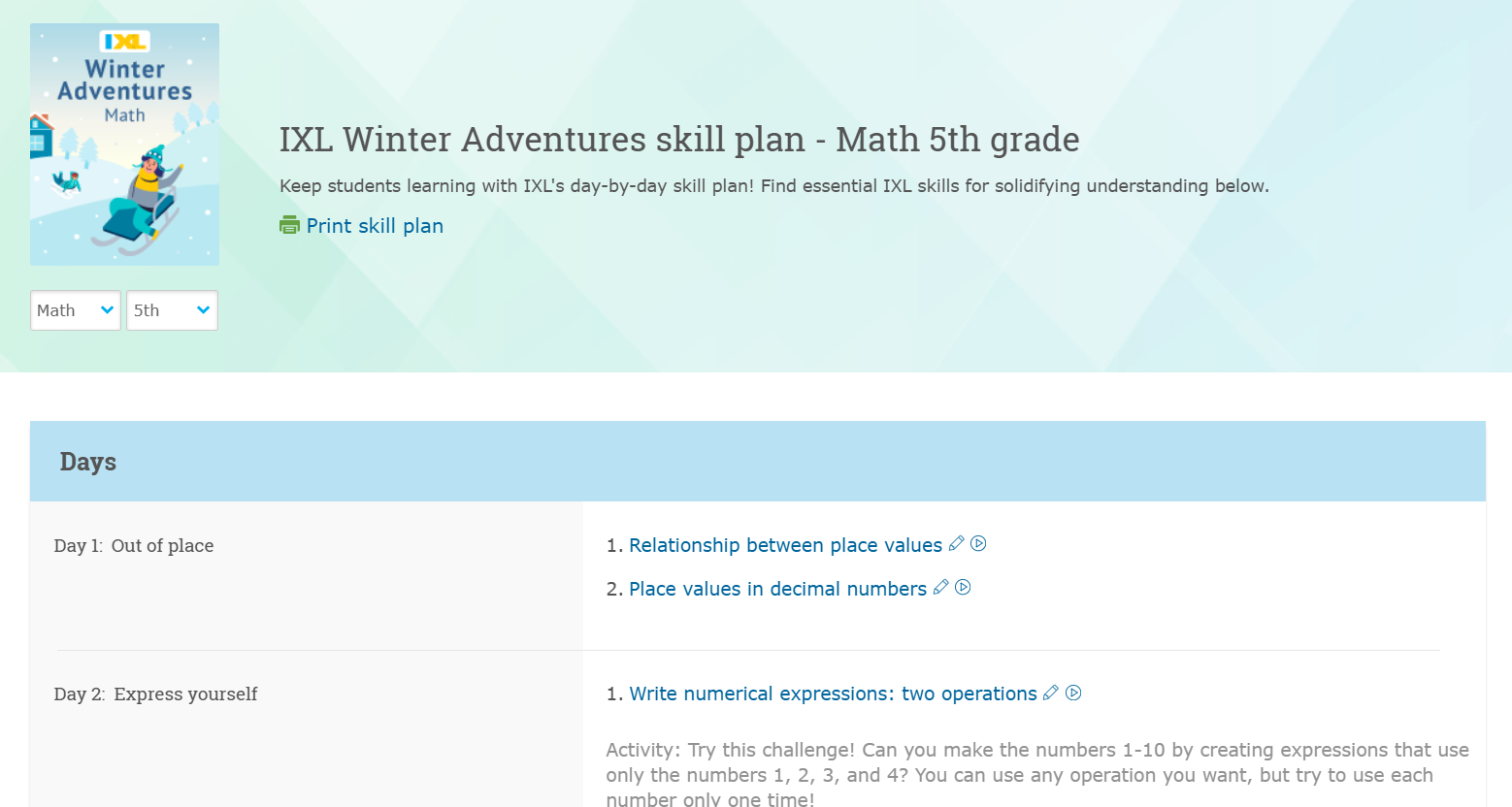
Our Winter Adventure skill plans are back for the chilly season! Available for math and ELA in kindergarten through 8th grade, Winter Adventure plans provide 20 days of IXL skills, challenges, and offline projects to keep students engaged while it’s cold outside. These activities cover both key mid-year topics and fun, extra learning explorations.
New math skill
We’ve released a new kindergarten math skill! In the new kindergarten skill Which picture shows more or less than a number – up to 20, students utilize several early math concepts to compare large arrangements of shapes to given numbers. This skill was specifically developed to address the TEKS standards and will help support our youngest students in Texas.
New English language arts skills
We’ve released two new ELA vocabulary skills for grades 4 and 5 focused on using words with roots and affixes. These skills are a great way for students to build confidence with vocabulary and deepen their understanding of how words work. Check out one of the new skills here!
New Spanish language arts skills
We’ve added three new Spanish language arts skills:
- Leer sobre comida [Read about food]: Students sharpen their reading comprehension skills while engaging with texts about a variety of foods—from innovative options like 3D-printed salmon to more traditional items like dates.
- ¿Cuál título de libro es mejor para la imagen? [Which book title goes with the picture?]: Students are presented with creative and interesting images that could be found on the cover of a book. Using their inference skills, they choose the book title that best matches each image.
- Leer ficción histórica [Read historical fiction]: Students analyze a long piece of historical fiction from a variety of angles while they practice making inferences, using context clues to determine the meanings of unfamiliar words, and examining the author’s craft and choices.
New science skills
We’ve released a few new high school science skills:
- Identify parts of a light microscope (Biology): Students identify the parts of a compound light microscope and their functions.
- Predict the shape of a molecule using VSEPR theory (Chemistry): Students use valence shell electron pair repulsion (VSEPR) theory to predict the shape of a molecule given its Lewis structure.
- Acceleration in one dimension (Physics): Students apply the average acceleration equation a = (vf-vi)/(tf-ti) to solve for unknown values.
New social studies skills
We’ve released two new social studies skills for high school U.S. history:
- The presidency of Dwight D. Eisenhower: Students investigate Eisenhower’s two presidential terms, from his election to his farewell address. Students analyze Eisenhower’s Cold War foreign policy and his domestic policies regarding anticommunism, the interstate highway system, and civil rights.
- The presidency of Ronald Reagan: domestic policy and legacy: Students explore Reagan’s time as president, from his rise in the conservative movement through his election and reelection. Students investigate Reagan’s economic policies, domestic achievements, setbacks, and his legacy.
New textbook skill plans
We’ve released skill plans for the following textbooks:
Math:
- Big Ideas Math (Grades 6 advanced and 7 advanced)
- New Century Maths (3rd edition) (Years 7-10, 9 advanced, and 10 advanced)
New standards skill plans
We’ve added high school skill plans for Florida’s B.E.S.T. Access Points for math and ELA. These skill plans align with alternate standards for students with significant cognitive disabilities.
Additionally, we’ve released social studies skill plans for Alabama Course of Study (adopted in 2024), covering K-8, U.S. History I & II, and Government. Plus, ELA skill plans for South Dakota Content Standards (adopted in 2025) for K-12.
New test prep skill plans
We’ve released skill plans for the new edition of TABE®, the Test of Adult Basic Education. These skill plans are for the recently released TABE® 13&14, with skill plans available for each of the four levels (Levels E, D, M and A) across the three domains (math, reading, and language).
Additionally, we’ve released new skill plans for the North Dakota A-PLUS Summative for math and ELA (grades 3-8 and 10) and science (grades 4, 8, and 10).
Finally, we’ve released new plans for the South Carolina EOCEP in Biology 1 as well as US History and the Constitution.
Additional releases
New math, ELA, and SLA video tutorials
Math:
We’ve released 30 new math videos to expand our coverage! These videos cover topics such as identifying acute, obtuse, and right triangles and approximating the area under a curve using trapezoids.
In addition, we’ve released 4 new localized math videos in the Canada edition.
Language arts:
We’ve released 3 new ELA videos across grades PK through 2! These videos cover topics such as reading along with fantasy.
Plus, we’ve released 3 more SLA videos across grades 3 through 5. Check one out here!
New independent practice units for Takeoff
We’ve released more independent practice workbook units for Takeoff grade 2! New units 6-8 join units 1-5, which were already available.
Additionally, we’ve released Spanish translation support for the first 5 units of independent practice for Grade 2 Takeoff. We’re excited to extend our translation support to these resources, further supporting teachers and helping Spanish-speaking English language learners succeed in math.
Teachers can find independent practice pages and answer keys within the materials list for the lessons where they’re available. We will release the final units of grade 2 independent practice, as well as Spanish translations for additional grade 2 units, within the next few months.
New Takeoff slide decks
We recently added a new resource for Takeoff, Takeoff instructional slides! Teachers can use these instructional slide decks to teach Takeoff lessons alongside provided student materials. We’ve added new instructional slides, meaning our slide decks now cover the following units:
- Kindergarten Unit 9
- Grade 1 Unit 10
- Grade 2 Unit 9
- Grade 3 Units 9-10
- Grade 4 Units 10-11
- Grade 5 Unit 10
These slides are available as downloadable PowerPoint files in the Materials section of each lesson. We’ll continue releasing slide decks throughout the year.
New Takeoff math practice alignments and teacher tips
For our K-5 Takeoff curriculum, we’ve added alignments to the Standards of Mathematical Practice to six states—Idaho, North Carolina, North Dakota, Oregon, Pennsylvania, and Tennessee! These alignments help teachers identify the most important practices to call out in each Takeoff unit, lesson, mid-unit check-in, and end-of-unit test.
In addition to the alignments, teachers in these states can find tips on how to support the practices across the unit in the “Math practices” tab on the unit outline pages.
Teacher toolkit for the UK, CA, and AU editions
Teachers using IXL’s Canada, UK, and Australia editions can go to the new Teacher Toolkit page to find all the information and resources they need to support their use of IXL, as well as discover features that are relevant to them.
The Teacher Toolkit replaces the Resources page, and it includes all the content from the Resources page that is relevant to the UK, CA, and AU editions, plus new resources not previously available there. It is the perfect place for teachers to get started with IXL, find implementation strategies, explore local skill plans, and discover how to best use our most popular engagement features.