Note: In March 2025, we updated the names of IXL’s diagnostics to better reflect the capabilities of our assessments! The assessment names, report titles, and other related terminology in this blog post may not be current. Get more information on the IXL Diagnostics here.
IXL’s Diagnostic gives school and district administrators all the benefits of a benchmark assessment in a lightweight and flexible format.
Now, Diagnostic data is getting even more flexible: Reports in IXL Analytics will display all available Diagnostic data for the previous school year! Administrators can see students’ knowledge levels recorded in assessments for the past year in addition to the current year, giving them even more data to track student performance over time.
Where to find past year Diagnostic data
Past year assessment data is available in most of the diagnostic reports for school and district administrators, including:
- Diagnostic Levels
- Diagnostic Strands
- Diagnostic Growth
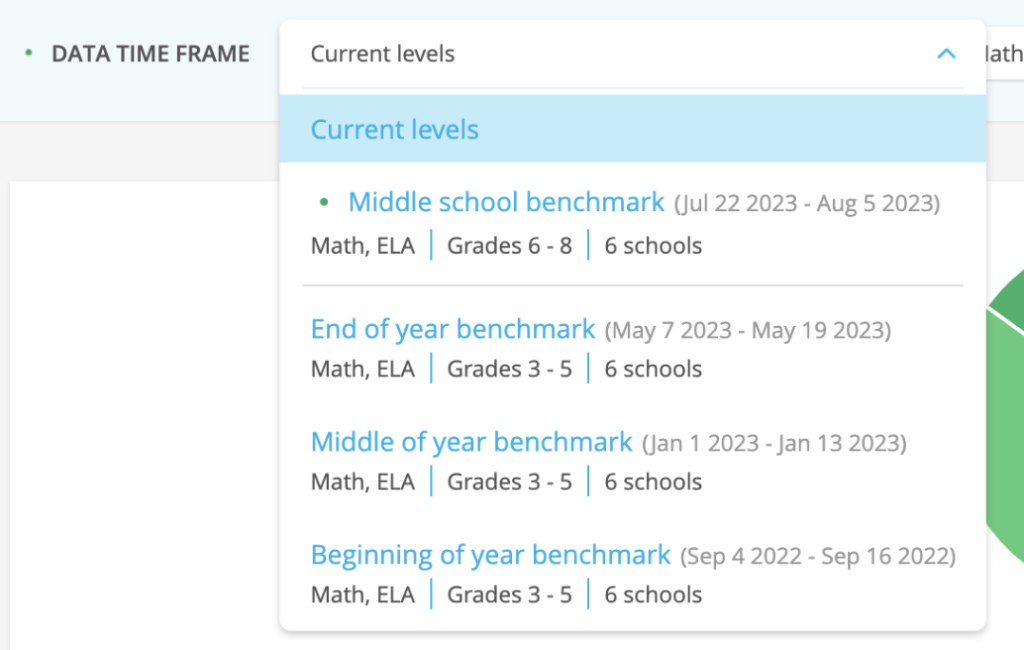
For the Diagnostic Levels and Diagnostic Strands reports, assessments from the previous school year will appear in the Data Time Frame dropdown menu below assessments from the current year. The listed Diagnostics now also show the year in which they were taken, in addition to the date range they covered. Simply select a past assessment and the report will display its data.
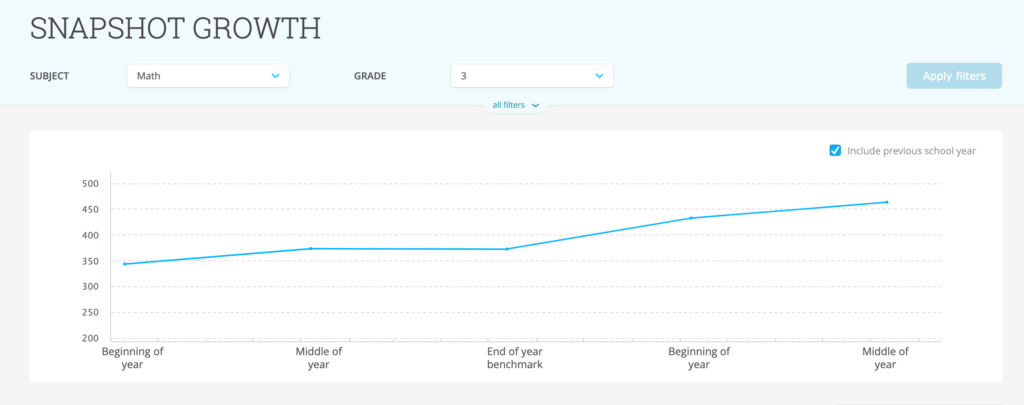
For the Diagnostic Growth report, administrators can add past assessment data to the report’s line graph display using the checkbox that says “Include information from previous year” above the graph. This box is unchecked by default, and the box will only appear if there are assessments from the previous year to view.
Filtering past Diagnostic data
Like Diagnostic data for the current school year, administrators can filter past data as well. Filters in these reports will still apply to students’ current rostering to make it easier for administrators to track present student cohorts and see their progress over time. For example, if a report is filtered to only show 4th grade, it will show students currently rostered to 4th grade even when looking at an assessment from the previous school year.
Similarly, the student data table and any exported data will reflect student grade, school, and teacher information as it’s currently rostered to keep data relevant to each school and district’s present conditions.
Year-over-year data
With past Diagnostic data, administrators can gain even more insights to identify areas of improvement for their students and hold data-driven conversations. This makes IXL Analytics a more powerful tool for schools and districts that use IXL for their assessment needs year-over-year.
Want to learn more about the Diagnostic? Visit our Diagnostic hub full of helpful resources. Plus, discover powerful strategies to support your schools in our admin resource center.