
At IXL, we never stop adding new features and skills to our award-winning teaching and learning platform, so you can always trust we’re on pace with students’ evolving needs. That’s why we compile a list of our top new features to help you—as a learner, educator, or parent—get the most out of IXL.
Keep reading below for a roundup of releases from May, including PreK-2 Spanish language arts skills, a faster LevelUp™ ELA assessment, national norms for all LevelUp math and ELA grades, and more! To stay current with our latest updates, follow IXL on Facebook, Instagram, X, and LinkedIn.
Table of contents:
- Major releases
- Feature updates
- Shorter assessment time for LevelUp™ ELA
- National norms for LevelUp ELA and high school math
- LevelUp grade-level classifications update more often
- Improvements to LevelUp accommodations
- Editable IXL Leaderboards
- Raceway challenges suggestable to students
- Enhanced skill filters for Skill Usage and Skill Proficiency reports
- LevelUp Math Diagnostic standards reports for MD and WV
- Skill plan updates and new skills
- Additional releases
- New math, ELA, and SLA video tutorials
- New dedicated platform for Takeoff
- New Takeoff Unit Assessment Insights report
- Takeoff Grade 6 Units 1 & 2 available
- Spanish translation for Takeoff Grade 6 Unit 1
- Family letters for Takeoff units
- Takeoff alignment to updated Maryland standards
- New Takeoff state alignments for performance tasks
- New Takeoff independent practice pages in Spanish for K-1
- New Takeoff slide decks in Spanish
- New math and science skills for CA, UK, and AU
Major releases
IXL Spanish Language Arts for grades PreK-2
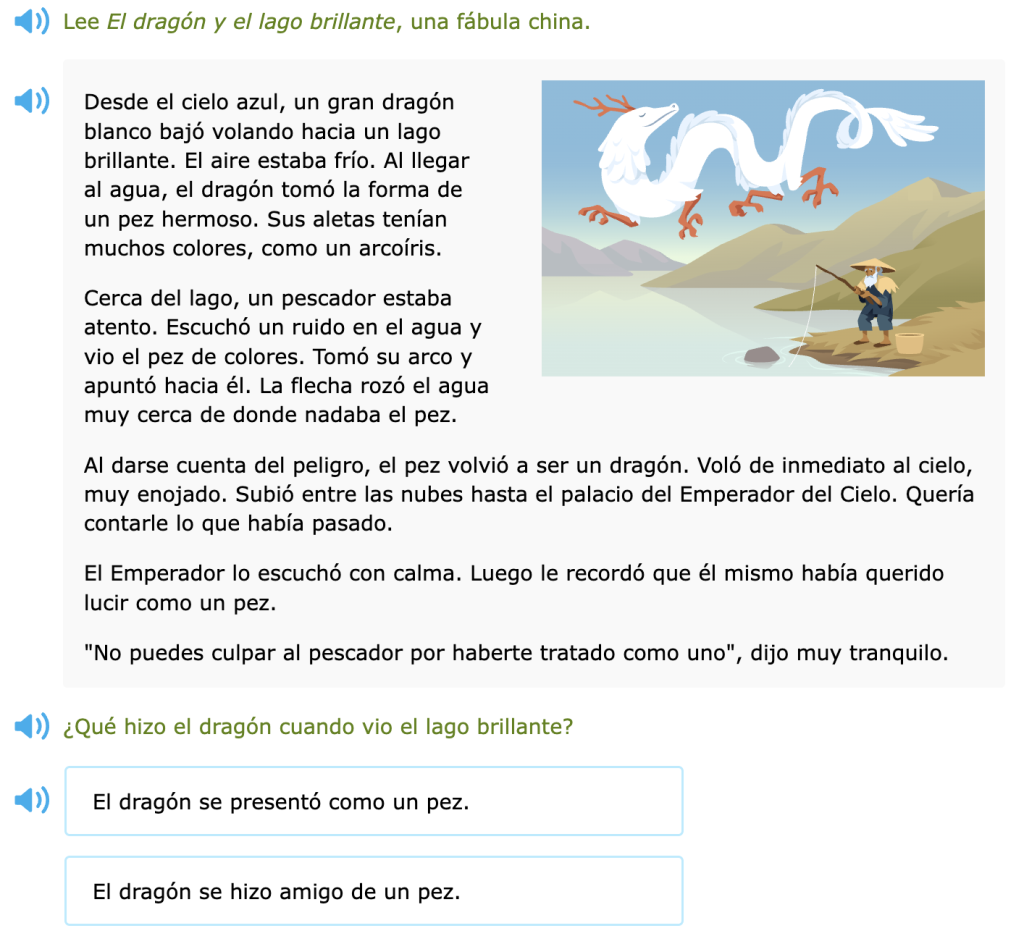
We have expanded our Spanish language arts (SLA) curriculum to include content for grades PreK-2! IXL now offers rich, authentic SLA instruction across the full PreK-5 range.
The new PreK-2 skills focus on the foundations of reading and early reading strategies. All content is authentically written in Spanish, created from the ground up by expert writers and curriculum designers. Additionally, every skill comes with a comprehensive video tutorial that features a fun and friendly Spanish-speaking tutor walking through the topic.
Feature updates
Shorter assessment time for LevelUp™ ELA
We’ve updated the LevelUp™ ELA assessment to provide comprehensive ELA levels in 90 minutes or less, instead of two hours! Admins and teachers can obtain all the same reliable LevelUp ELA insights they need in a fraction of the time, providing an experience that is easier to schedule and less fatiguing for students.
The Reading and Writing & Language Benchmarks are now combined into a single assessment, providing the same rigor and trusted insights in a shorter experience. Students will see the same familiar format and question types, and educators will continue to receive meaningful ELA insights, including an overall ELA score, strand-level insights, and personalized recommendations.
National norms for LevelUp ELA and high school math
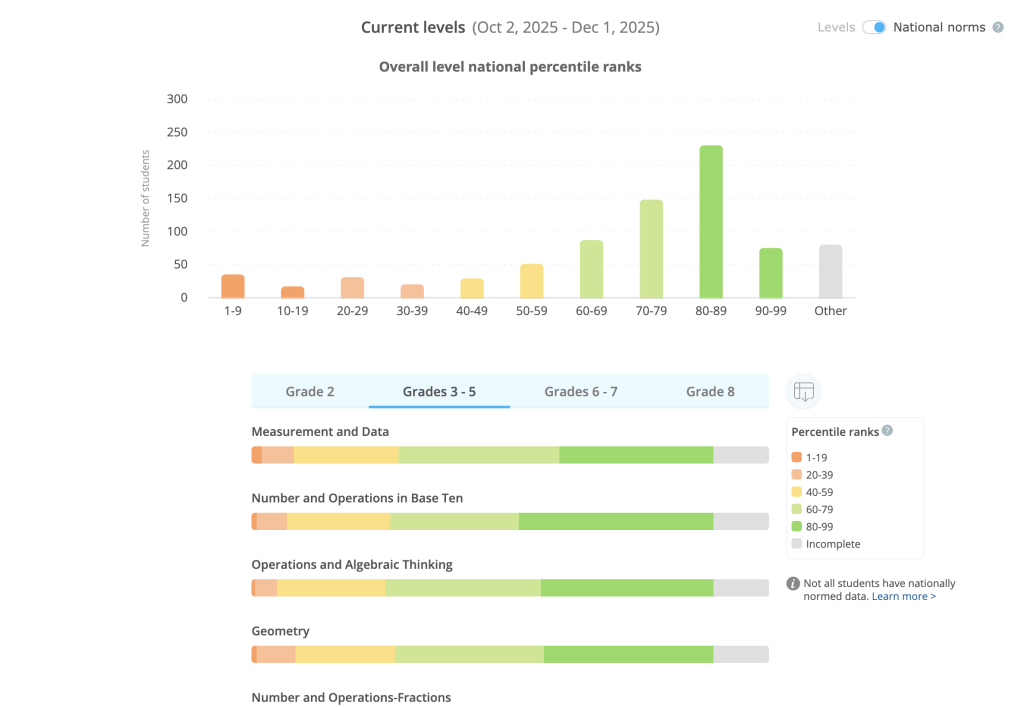
We now have national norms for the LevelUp Diagnostic for all of K-12 in both math and ELA! Previously, national norms were only available for K-8 math.
National norms help educators contextualize how students are performing on the diagnostic relative to other students across the country.
Nationally normed percentiles can be found on the LevelUp Diagnostic Results report for administrators and the LevelUp Diagnostic Overview report for teachers.
LevelUp grade-level classifications update more often
The on, above, below and far below grade classifications for LevelUp scores will now be updated on a monthly basis instead of three times a year.
The initial classification will occur on each account’s first day of school, then update on the same date each month. For example, an account with July 15 as the first day of school will reflect updated grade-level calculations on the 15th of each month. This makes these classifications more flexible and updates to them more predictable.
Enhancements to LevelUp accommodations
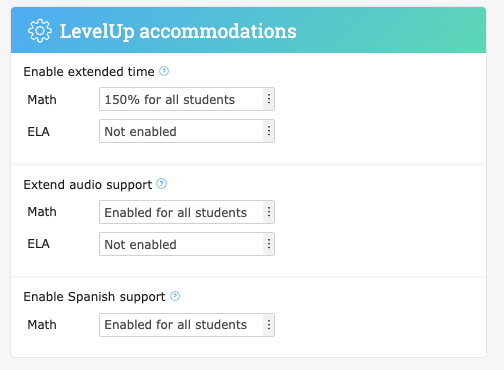
Administrators and teachers now have more control over LevelUp accommodations to ensure a smooth, flexible diagnostic experience for students. These updates include:
- Administrators can now manage all LevelUp accommodations, including extended time, audio support, and Spanish language support, from the admin student roster page.
- LevelUp accommodations are separate from practice settings. Teachers will see separate LevelUp accommodations settings in their profile and settings page.
- Teacher control over LevelUp accommodations can be toggled. Lead administrators can decide whether teachers have permission to set and edit accommodations on the account settings page. This toggle is defaulted to on.
Editable IXL Leaderboards
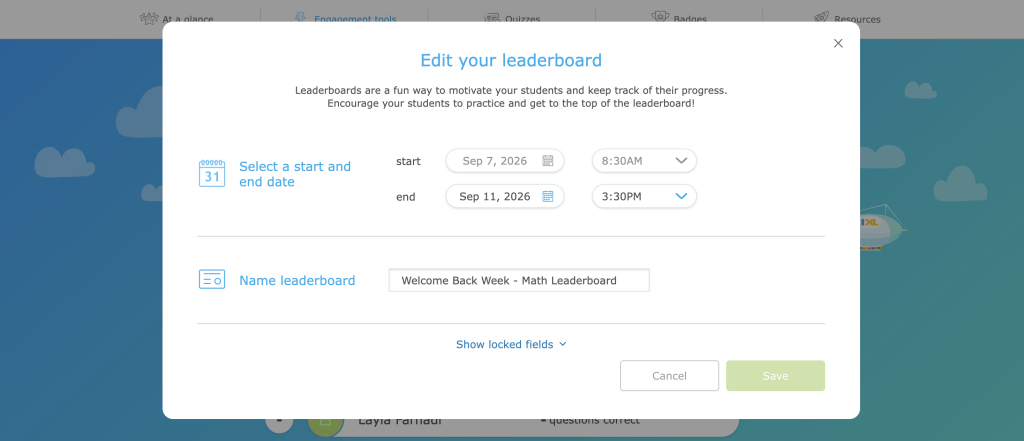
Admins and teachers are now able to edit IXL Leaderboards directly! The creator of a leaderboard can access the editing screen by clicking the button with the pencil icon.
If the leaderboard has not yet started, all settings are editable. While a leaderboard is in progress, settings that impact the standings are not editable; only the leaderboard name and end date can be modified.
Additionally, the End early button on the leaderboard banner has been removed. Users can immediately end a leaderboard by changing the end date to Now on the current date.
Raceway challenges suggestable to students
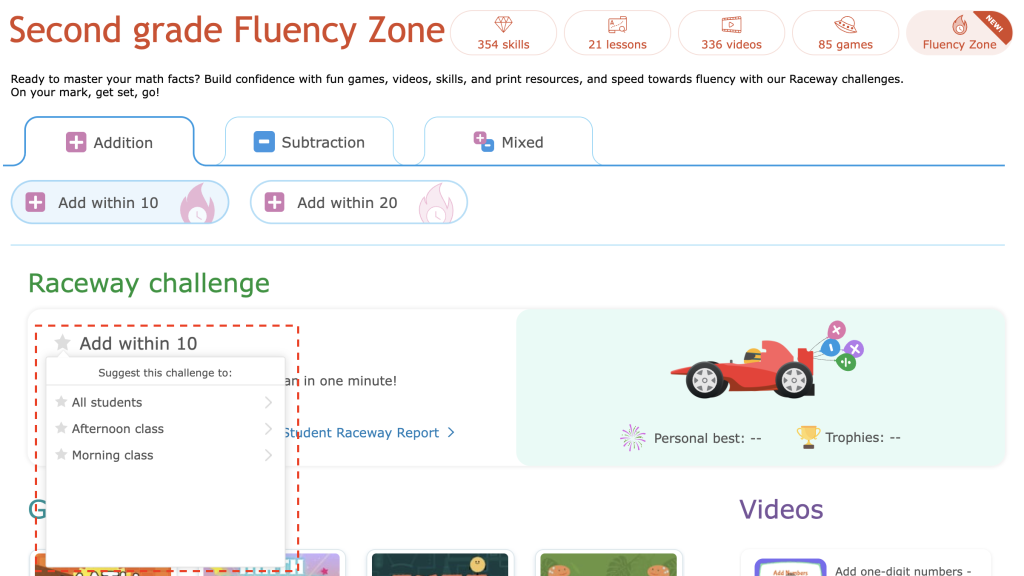
Teachers can now suggest Raceway challenges in the Fluency Zone to their students! This makes it easier for teachers to direct students to the exact challenges they need to work on.
Selecting the star icon lets teachers suggest Raceway challenges to their whole roster, specific classes, or individual students. Suggested challenges will appear in the “From your teacher” section of students’ dashboards. Teachers can manage suggested challenges on their own dashboards, just like suggested skills.
New skill filters for Skill Usage and Skill Proficiency reports
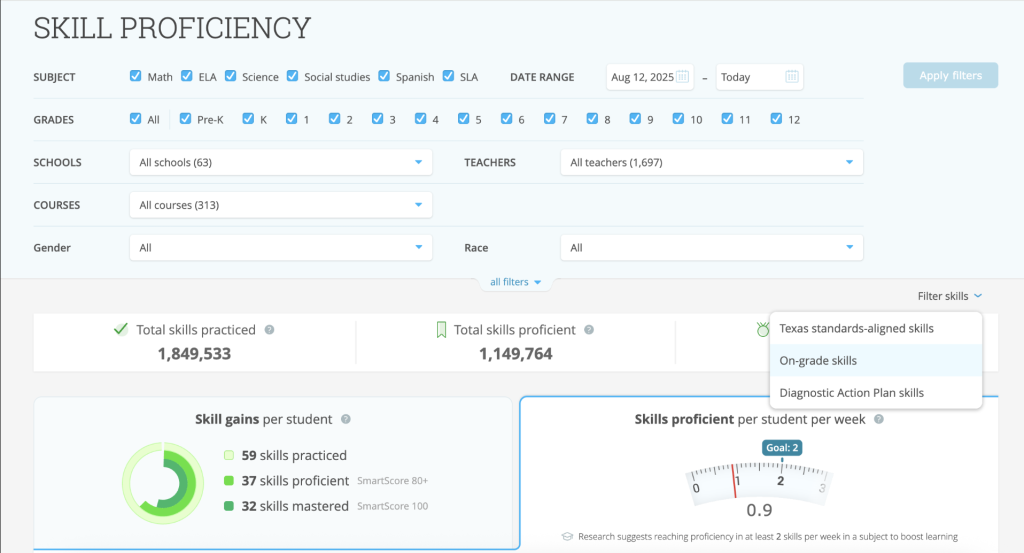
We’ve released new skill filters for the Skill Usage and Skill Proficiency reports, available for all English-language editions of IXL!
Admins can now filter skill practice and proficiency data by the following categories:
- On-grade skills only: View data for skills aligned to each student’s rostered grade level.
- Diagnostic Action Plan skills only: View data for skills from students’ personalized Diagnostic Action Plans.
- State standards-aligned skills only: View data for skills aligned to your state standards (US edition only).
These new filters make it easier to analyze practice and proficiency trends based on the specific types of content students are working on.
LevelUp Math Diagnostic standards reports for K-8 Maryland standards and integrated high school standards in West Virginia
We’ve released standards reports for the LevelUp Math Diagnostic for updated Maryland K-8 standards, as well as for West Virginia high school standards in two additional courses: Integrated Math I & Integrated Math II.
Skill plan updates and new skills
Fall Power-Up plans for math and ELA return
Our Fall Power-up skill plans are back! These plans provide daily skill recommendations that review important concepts from the previous year, so students are caught up and ready to move forward.
Available for K-12 in both math and ELA, the Fall Power-up plans feature 20 days of skill recommendations to help students review their knowledge and start the school year strong.
New StudyWise plans for Minnesota NWEA MAP Growth
IXL’s StudyWise tool turns students’ previous test scores into their own personalized study plans. We’ve expanded our StudyWise support for Minnesota NWEA MAP Growth to include science for 2nd to 8th grade. These plans were created in partnership with NWEA.
Teachers and students can now input scores into StudyWise to generate personalized plans that align with these Minnesota MAP tests. As usual, admins can also request bulk uploading scores for their school. Teachers and students who previously created Minnesota MAP study plans will continue to see those plans in their account.
New math skills
We’ve released 13 new math skills for middle school through Calculus!
- Checkpoint: The coordinate plane (Grade 6)
- Checkpoint: Area of polygons (Grade 6)
- Describe associations between two variables using scatter plots (Grade 8)
- Add, subtract, multiply, and divide numbers written in scientific notation: word problems (Grade 8)
- Describe scatter plots (Grade 8)
- Factor a polynomial given a root (Algebra 2)
- Domain and range of reciprocal functions (Algebra 2)
- Find volumes using the disk method: revolve around the x-axis or y-axis (Calculus)
- Find equations of tangent lines using derivatives: polynomial functions (Calculus)
- Find equations of tangent lines using derivatives: other functions (Calculus)
- Find volumes using the disk method: revolve around a horizontal or vertical line (Calculus)
- Find derivatives: mixed review (Calculus)
- Find concavity and inflection points (Calculus)
New English language arts skills
We’ve released ten new ELA skills, spanning kindergarten through 12th grade!
- Read short vowel words (Kindergarten): Students read a short vowel word (e.g., nut) and choose the matching image. This skill helps emerging readers build confidence as they decode individual words.
- Main idea skills (Grades K-2): Students identify the topic of an informational text, then the main idea followed by a detail. Starting with the topic of the text helps young readers learn the difference between what the overall passage is about and what the author is trying to convey to the reader. In the grade 2 version, students start with the main idea and then identify a detail.
- Determine the topic and theme of a story (Grade 1): Students listen to a story and answer three questions: one question about the story’s topic, one question about a key detail that points to the theme, and one question asking students to identify the theme.
- Change one letter to make a new word (Grades 1-2): Students change letters and sounds in a word can make an entirely new word!
- Read short vowel stories (Grade 2): A new decodable text skill where students read stories featuring short vowel words, then answer comprehension questions. This skill supports the development of reading fluency and builds confidence in connected text.
- Determine multiple main ideas of a passage (Grade 7): Students identify two main or central ideas in an authentic text, then analyze text details to develop these ideas.
- Analyze the development of theme (Grade 9): Students analyze how the author’s choices suggest broader themes in excerpts from literary texts.
- Analyze craft and structure in literary passages (Grade 11): Students analyze structural choices and author’s craft techniques in excerpts from engaging literary texts.
- Analyze character development (Grades 11-12): Students close-read literary passages and identify how the author’s craft supports inferences related to characterization.
- Analyze craft and structure in informational passages (Grades 11-12): Students analyze structural choices and author’s craft techniques in excerpts from engaging nonfiction texts.
New Spanish language arts skills
We’ve added 31 new SLA skills for grades PreK-5! Here are a few highlights:
- Escoger la letra mayúscula que corresponde al sonido: repaso [Choose the uppercase letter that matches the consonant sound: review] (PreK): Students listen to an audio prompt asking which letter makes a certain sound. The prompt contains the letter sound, not the letter name, helping students master letter-sound correspondences.
- Comparar ilustraciones mitológicas [Compare mythological illustrations] (Grade 4): Students compare two illustrations based on interpretations of myths and folktales.
- Leer sobre historia [Read about history] (Grade 5): Students practice identifying main ideas, making inferences, and using context clues while reading informational texts on topics such as the “Year of Confusion,” the Skalds, and the origins of tea.
New science skills
We’ve released 32 new science skills!
- Food chains (Grade 1)
- Behaviors that help baby animals survive (Grade 1)
- Consumers and producers in food chains (Grade 2)
- Communicating with patterns: Morse code (Grades 4-5)
- Design an experiment about a balloon rocket on a string (Grade 5)
- Evaluate anatomical evidence of evolution (Grades 6-8)
- The periodic table – metals, nonmetals, and metalloids (Grades 6-8)
- Lake biodiversity and eutrophication: explore a problem (Biology)
- Mendel’s laws of heredity (Biology)
- Natural selection in action: antibiotic-resistant bacteria (Biology)
- How does tonicity affect plant and animal cells? (Biology)
- Lake eutrophication: evaluate solutions (Biology)
- Determine the average reaction rate (Chemistry)
- Select a laboratory tool for an experiment (Chemistry)
- Single and double replacement reactions: predict products and balance equations (Chemistry)
- Convert between particles and moles of a substance (Chemistry)
- Calculate the number of particles of a reactant or product (Chemistry)
- Calculations involving dilutions (Chemistry)
- Compare acid and base strength (Chemistry)
- Types of radioactive decay (Chemistry)
- Convert between moles, mass, particles, and volume of a substance at STP (Chemistry)
- Calculations with significant figures (Chemistry & Physics)
- Orbital motion (Physics)
- The first law of thermodynamics (Physics)
- Centripetal force (Physics)
- Centripetal acceleration (Physics)
- Magnetic force calculations: moving point charges (Physics)
- Magnetic force calculations: current-carrying wires (Physics)
- Spring oscillations: period and frequency (Physics)
- Introduction to waves (Physics)
- Introduction to circuit diagrams and equivalent resistance (Physics)
- Analyze simple harmonic motion graphs (Physics)
New social studies skills
We’ve released two dozen new social studies skills!
- Work and jobs (Grades K-1)
- Environmental features and their uses (Grades 2-3)
- Read and create timelines (Grades 2-5)
- Region profile: the Plains (Grades 4-5)
- Native peoples of the Pacific Northwest (Grades 4-5)
- Native peoples of the Southwest (Grades 4-5)
- Identify cause and effect in informational texts (Grades 4-5)
- Identify primary and secondary sources (Grades 4-5)
- Region profile: the Far West (Grades 4-5)
- Region profile: the Rocky Mountains (Grades 4-5)
- Economic systems (Grades 6-8)
- Compare economic systems: Brazil, Cuba, and Mexico (Grades 6-8)
- Balance a budget (Grades 6-8)
- Politics and society of the 1920s (Grades 7-8)
- Jim Crow (Grades 7-8)
- Progressive Era Reform Movements (Grades 7-8)
- World War II: the European and Pacific theaters (Grades 7-8)
- The Cold War Begins (Grades 7-8)
- The Vietnam War: Part 1 (Grades 7-8)
- Women’s suffrage (U.S. History)
- Immigration after the Civil War (U.S. History)
- The end of Reconstruction (U.S. History)
- Politics in the Progressive Era (U.S. History)
- World War II: the Pacific Theater (U.S. History)
New textbook skill plans
We’ve released skill plans for the following textbooks:
Math:
- Zearn Math (Grades K-8)
- enVision+ Mathematics (Grades K-8 and accelerated grade 7)
- South Carolina Reveal Math (Grades K-5, courses 1-3, and accelerated courses 2-3)
ELA:
- Great Minds Arts & Letters (Grades 7-8)
Science:
- McGraw Hill Florida Science (Grades K-5, Comprehensive Courses 1-3, Earth and Space, Life, Physical, Biology, Chemistry, and Physics)
- OpenSciEd (Grades 4-5, Biology, Chemistry, and Physics)
New standards skill plans
We’ve released new standards skill plans for:
- Wyoming Content & Performance Standards (adopted in 2023) (Grades K-8 math and science, Algebra 1, Geometry, Algebra 2, Integrated Math 1-3, Biology, Chemistry, and Physics)
- Oklahoma Academic Science Standards (adopted in 2026) (Grades K-8, Biology, Chemistry, and Physics)
- Iowa Academic Standards for ELA and Literacy (adopted in 2024) (Grades K-12)
- Louisiana Student Standards (adopted in 2025) for Math (Grades K-8, Integrated Math 1–3, Algebra 1, Geometry, and Algebra 2)
- Louisiana Student Standards (adopted in 2026) for Language Arts (Grades K-12)
- Maryland College and Career Ready Standards for Language Arts (adopted in 2025) (Grades PreK-12)
- South Carolina College- and Career-Ready Standards (adopted in 2023) (Reasoning in Mathematics and Applications & Modeling)
New test prep skill plans
We’ve released ELA plans for grades 3-12 aligned to the ReadBasix assessment. ReadBasix by Capti is an assessment used to pinpoint foundational reading issues for older students.
Additional releases
New math, ELA, and SLA video tutorials
Math:
This release includes 50 new math videos to expand our library, covering topics like income and gifts and completing a table to graph a linear function.
We’ve also released 12 new localized math videos in our Canada edition.
Language arts:
We’ve added 23 new ELA videos for elementary and high school skills. These videos cover topics like inserting dialogue into a story and avoiding double, illogical, and unclear comparisons.
Additionally, along with the 100+ new SLA videos included in the SLA PreK-2 launch, we’ve released 49 videos for recently introduced SLA skills. These videos cover topics like learning the letter Ñ (Aprender la letra Ñ) and reading about famous places (Leer sobre lugares famosos).
New dedicated platform for Takeoff
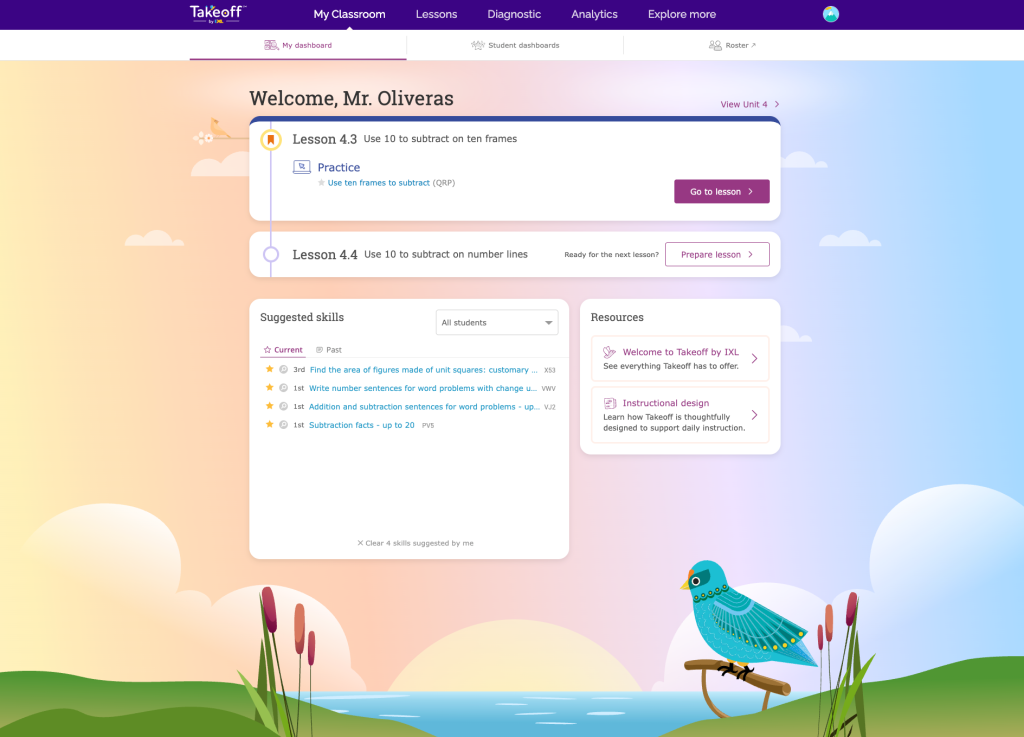
Takeoff gives teachers everything they need to teach math expertly every day. Now, Takeoff has its own dedicated platform, purpose-built for core math instruction!
This new experience gives teachers a clearer, more guided path through each day, making it easy to know where to go and what to do next. Features include:
- Dedicated dashboards: Teachers and students each have a Takeoff dashboard designed around their daily experience. Teachers can bookmark the lesson they’re teaching for easy access and stay on top of student assignments. Students will see the activities for their current lesson as soon as they sign in.
- Redesigned lesson plans: Every portion of every lesson now incorporates both print and online options for each activity, giving classrooms a variety of ways to learn. The plans also offer a consistent daily routine (prepare → teach → release to independent practice) built on top of the existing math curriculum.
- Responsive teaching tools built into lessons: Tools such as Group Jam and Live Classroom are integrated directly into daily instruction, helping teachers see student understanding and respond to needs in the moment.
Takeoff customers receiving the new experience can access it at ixl.com/takeoff. Sign-in and rostering information will carry over automatically for customers transitioning to the new platform.
New Takeoff Unit Assessment Insights report
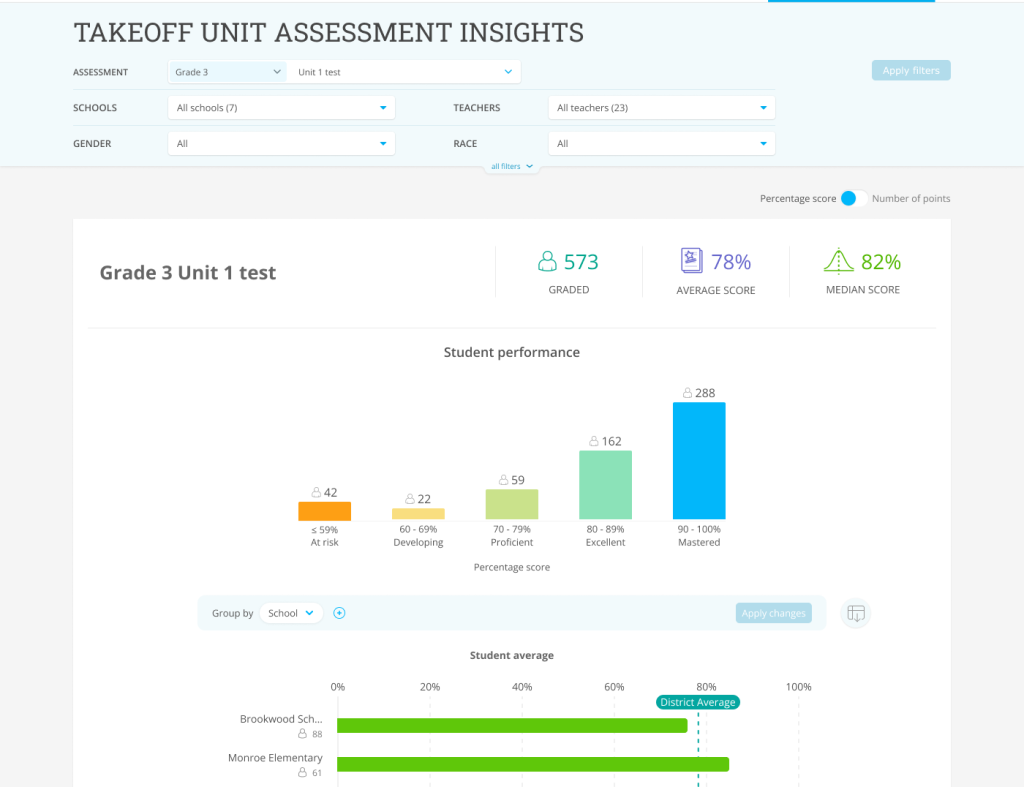
School and district administrators can now easily access Takeoff quiz and test data from the school year through the new Takeoff Unit Assessment Insights report!
This report gives admins a comprehensive view of performance on Takeoff assessments by highlighting the number of graded submissions, average, median, and distribution of student scores. Admins can group average scores by school, teacher, or demographics to compare data between different cohorts. They can also drill down into individual student scores.
This report is located under the new Takeoff tab within District and School Analytics. We’re excited to provide admins with more visibility into student performance on Takeoff assessments!
Takeoff Grade 6 Units 1 & 2
The first and second units of Takeoff Grade 6 are available for both National and California editions! Unit 1: Numerical expressions introduces students to exponents, least common multiples, greatest common factors, and more. In Unit 2: Operations with whole numbers and decimals, students develop fluency with the standard algorithms for whole-number division and decimal operations.
As in Takeoff K-5, users will have access to features like Personalization days, suggested IXL skills, and language tips. They’ll also find our beloved Think and talks, characters, and spiral review problems throughout the unit.
Spanish translation for Takeoff Grade 6 Unit 1
In addition to the new English-language Takeoff Grade 6 units, we have translated the first unit of Takeoff Grade 6 into Spanish! Unit 1 includes Spanish versions of the student workbook PDFs, independent practice PDFs, and the unit test. This support is available for both the National and California editions.
Family letters for Takeoff units
Family letters are now available for the Takeoff National edition! These letters describe to families what their students will be learning in each unit, and they can be printed and sent home to help keep parents and guardians informed about their children’s learning.
Family letters can be found in the additional resources tab for most units in grades K-5 now, but some units’ family letters will be released in the next few weeks. They are available in English and Spanish.
Takeoff alignment to updated Maryland standards
We’ve added alignments for the 2025 Maryland math standards to our K-5 Takeoff curriculum. When signed into a Takeoff account, educators in Maryland will see their state standards in all the usual places, such as on each grade level’s landing page and at the top of each unit and lesson.
New Takeoff state alignments for performance tasks
We’ve added state standards alignment to K-5 Takeoff performance tasks for the following states:
- Alaska
- Arizona
- Kansas
- Massachusetts
- Mississippi
- New Jersey
- New York
- Ohio
Performance tasks offer rich, high-order thinking opportunities, and can be used as standalone projects or alternate assessments.
New Takeoff independent practice pages in Spanish for K-1
We’ve released Spanish translation support for the independent practice pages for all kindergarten and 1st grade units in the National and California editions of Takeoff!
As a reminder, teachers can find independent practice pages and answer keys within the materials list for the lessons where they’re available.
New Takeoff slide decks in Spanish
We’ve released Spanish versions of Takeoff instructional slides for all K-5 units in both the national and California editions! These slides are available as downloadable PowerPoint files in the Materials section of each lesson.
New math and science skills for CA, UK, and AU
We released several new math and science skills in our Canada, Australia, and UK editions! Here are some examples:
- In the Canadian kindergarten skill Covers more or less, students compare the sizes of objects and the space they cover. This skill builds a foundation for understanding the concept of area.
- In the UK Year 10 skill Make an estimate from sample data, students make estimates about an entire population from sample data. Students must work with data in a variety of contexts, such as in a written scenario, in a table, or as a dot plot.
- In the Australian Year 12 skill Verify solutions to differential equations, students practice checking whether a specified value or function is a solution to a given differential equation. This lays crucial groundwork for later skills in which students are expected to generate their own solutions. This skill is also available in the Canadian and UK editions.